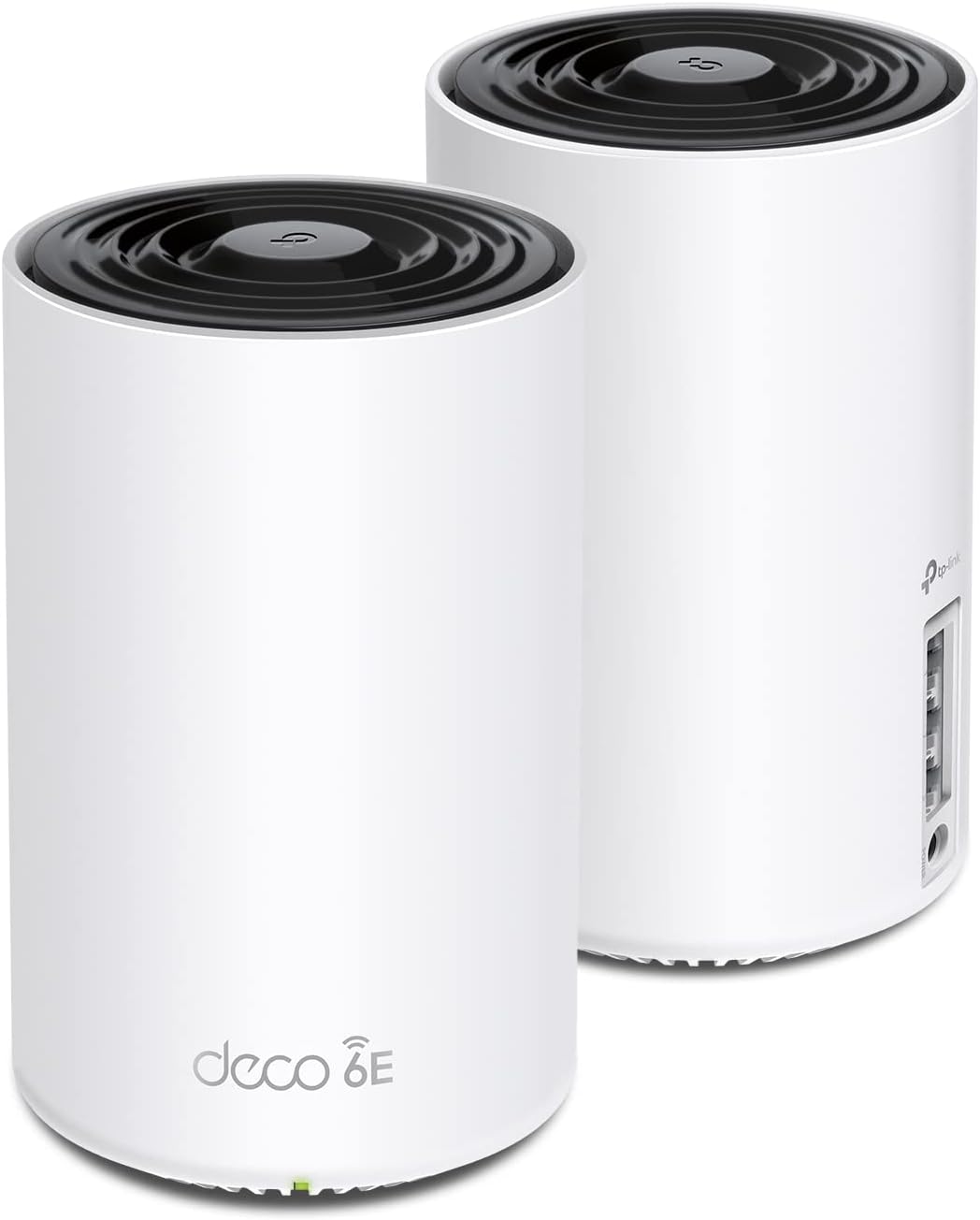
🚀 Elevate your WiFi game — coverage, speed, and smarts all in one sleek mesh system!
The TP-Link Deco XE75 AXE5400 is a cutting-edge WiFi 6E tri-band mesh system designed to cover up to 5500 sq.ft with ultra-fast speeds up to 5400 Mbps. Featuring a new 6 GHz band for interference-free connections and AI-driven mesh technology, it delivers seamless, adaptive WiFi for up to 200 devices. With robust security via TP-Link HomeShield and easy app-based setup and management, this 2-pack system replaces traditional routers and extenders, future-proofing your home or small office network.


| ASIN | B09VW5JHPH |
| Antenna Location | Gaming |
| Antenna Type | Internal |
| Best Sellers Rank | #121 in Electronics ( See Top 100 in Electronics ) #2 in Whole Home & Mesh Wi-Fi Systems |
| Brand | TP-Link |
| Built-In Media | 1 x Quick Installation Guide, 1 x RJ45 Ethernet cable, 2 x Deco XE75 units, 2 x Power adapters |
| Color | Black and White |
| Compatible Devices | Personal Computer |
| Connectivity Protocol | Wi-Fi |
| Connectivity Range | 5500 Square Feet |
| Connectivity Technology | Ethernet, Wi-Fi |
| Control Method | App |
| Controller Type | App Control |
| Coverage | 5500 square feet |
| Customer Reviews | 4.3 4.3 out of 5 stars (8,785) |
| Data Transfer Rate | 5400 Megabits Per Second |
| Frequency | 6 GHz |
| Frequency Band Class | Tri-Band |
| Global Trade Identification Number | 00840030707131 |
| Is Modem Compatible | Yes |
| Item Dimensions L x W x H | 4.13"L x 4.13"W x 6.67"H |
| Item Type Name | WiFi 6E Mesh |
| Item Weight | 2.7 Pounds |
| LAN Port Bandwidth | 10/100/1000 Mbps |
| Manufacturer | TP-Link |
| Maximum Upstream Data Transfer Rate | 2402 Megabits Per Second |
| Mfr Part Number | Deco XE75(2-pack) |
| Model Name | Deco XE75(2-pack) |
| Model Number | Deco XE75(2-pack) |
| Number of Antennas | 3 |
| Number of Ports | 6 |
| Operating System | Linux 4.4.60 |
| Other Special Features of the Product | Alexa Compatible, Guest Mode, Internet Security, Access Point Mode, Beamforming, Parental Control, QoS |
| RAM Memory Installed | 512 MB |
| Security Protocol | WPA-Personal, WPA2-Personal, WPA3-Personal |
| Smart Home Compatibility | Smart Home Compatible |
| UPC | 840030707131 |
| Unit Count | 1.0 Count |
| Warranty Description | 2 year manufacturer |
| Wi-Fi Generation | WiFi 6E |
| Wireless Compability | 802.11ac, 802.11ax, 802.11b, 802.11g, 802.11n |
C**B
Excellent Mesh Network that meets my requirments
UPDATE 8-Dec-2024: In my review I mentioned the TP-Link Dual-Band BE5000 WiFi 7 Mesh Wi-Fi System (Deco BE25) was a lot more expense, and I suggested waiting until you needed WiFi 7. Well, the price is so close to the WiFi 6 I'd go with it now to help future proof! I didn't check other vendors, and I don't have the WiFi 7. If I had to buy today, I'd do the WiFi 7 for sure. 2-Pack WiFi 6 = $220 ($110 each) 2-Pack Wifi 7 = $230 ($115 each!!!!!) 3-pack, WiF 6 = $330 ($110 each) 3-pack WiFi 7 = $300. ($100 each!!!!!!!) UPDATE 29-Sep-2024: I'm totally satisfied. ZERO issues, works beautifully. I had this at 4-Stars to start as installation and set-up went smoothly however I wanted time for it to "bake-in" with use., now I'm at 5-Stars. There is a TP WiFi 7 model available that does cost less than other vendors, still expensive though. The WiFi 6E was $188 for the pair, WiFi 7 is $449 for a pair. That's a big jump, and yes, from what I've read you'll get higher performance. The question that needs to be asked: Do you need it for the extra price? If you can easily afford it, no reason not to. I've worked for 30 years as a network design/architect/consultant in the carrier industry. As described below, for my requirements the TP WiFi 6E is perfect. In 5 years, I may need to look into upgrading to a higher grade mesh. By then, prices will come down for a WiFi 7 and maybe when WiFi 8 is out that'll be a consideration. For now, WiFi 6E works. I give routers a 5-year life span as tech improves rapidly, but do you need annual upgrades? Not in my world, yet. I'm still waiting for 5G cellular service in my rural setting yet I do get 80Mbps down/19Mbs up (Verizon), and in some places in Colorado Springs I've clocked 1.3Gbps on my iPhone which is insanely fast. My iPhone does provide good hotspot backup if needed. If you have a "Brady Bunch" size family, maybe the WiFi 7 would better, and you may need more than 2 routers in the mesh depending on your house, basement, patio, number of devices and floors. The nice thing about the TP mesh is adding more as needed is easy, as it should be today. GENERAL: 16-Sep-2024 I needed a new WiFi mesh solution. I'll explain why in a bit. For 99% of the users at home, basic settings should be fine. For those with bespoke setting requirements, they know what needs to be done. This isn’t a commercial grade device like from Cisco or Meraki although for small offices, I think the XE75 would be excellent. DETAILS TO CONSIDER: I’m using the TP Deca XE75 – be SURE to know this, not Deco AXE5400 as this is not a choice when registering via the app. I use just a pair in a 3,800’ slab-on-grade ranch. Each XE75 works at 2.4/5/6Ghz. There are 3 “Networks”: Router, Guest and IOT to isolate connections. Pricing was excellent at $219 for the pair + a $30 discount coupon! This is not a Base plus Extender, these are both full-function WiFi routers with the first one setup being the Main. They each have 3 UTP Gbit ports. I only needed UTP on the Main. Password, frequencies, ect settings are all transparent across the mesh network. You can click on each Wifi router in the mesh to see what is connected to each. Each SSID will have its own password. Be sure to use Upper/lower/a few numbers/a few special characters, and MAKE SURE TO JOT THEM DOWN! SSID Router and Router_6Ghz + Password you create - iPhone, laptop, printer, SAN/NAS SSID Guest + Password you create: if I have visitors SSID IOT + Password you create: all other connections like Hunter-Douglas PowerView (motorized Roman shades), TVs, 22KW Generac generator, DTV, DVD, etc that have vendor access for updates and such. SETUP: SUGGESTION: Unplug your ISP equipment before you start setting up the app. My iPhone just downloaded via my Verizon cell connection nicely. This gives your ISP equipment the 5 or more minutes to quiesce (shutdown, clear). When I connected to my ISP equipment and powered-up, I called my ISP, they saw the new device, authorized and in a few seconds I was back on-line. Download the TP App, and follow the instructions step-by-step. When setting up, each XE75 has a barcode on the bottom that needs to be scanned as you set them up – easier than typing in the code. It’s a tad fuzzy to scan, just don’t give up. I used an iPhone 13 Pro to scan and was surprised how difficult it was. Just follow the instructions at setting up the router EXACTLY (keyword=EXACTLY) as they say. The app will ask you to name it, I used Office from the choices, and I think you could do a custom name. With my ISP, I have to call and tell them a new router is being connected so they can authorize it for security. My ISP is a local company in Colorado, Kellin, that services remote areas hence microwave (plans in the next 12-18 months include going up-to 500Mbps - way more than I need), and support is seriously fantastic after more than 10 years. The UTP ports (3 on each route) support 1Gbps. The TP should work for all ISP, probably even StarLink although check first to be sure. The App set-up worked great as I followed the instructions EXACTLY as they specified. Next, I created PASSWORDS for Office, Guest and IOT networks. Next, I added the other XE75 to the mesh using the barcode reader, and boom, up it came, connected to the mesh and I named it Bedroom. On the App you’ll see: ISP icon---Office/MAIN icon----Bedroom icon (these are my locations) plus you’ll see how many devices are connected to each with a footnote number for each. Nice. Next, I started discovery for Router – my laptop runs at 6Ghz. BTW, UTP connections go to Router only that I can tell, not Guest or IoT Next, I started discovery for IOT No Guests yet, however, they should connect as easily Under “More Settings” at the lower right corner of the app, click and you’ll see Wi-Fi Setting (Main Network), then Guest Network and IoT Network. Pretty straight forward; naming Wi-Fi Setting the same as the Main Network would make better sense at least to me. In Wi-Fi and Guest Networks you have 2.4/5Ghz and 6Ghz network options. In IoT you only have 2.4/5Ghz. I turned off 6Ghz for Guest as 2.4/5Ghz will be fine plus you’ll get better distance and plenty of bandwidth performance. If I need to connect my laptop to Guest or IoT, my laptop selects the highest frequency. My iPhone 13 doesn’t do 6Ghz. When I upgrade my iPhone in a year or 2, it’ll probably have 6Ghz. PERFORMANCE: My microwave ISP is 120Mbps Up/Down, plenty for me. I don’t game or have kids. I work from home as a consultant, do WebEx/Zoom/MS Teams video calls that are excellent quality, I’ll watch an Amazon Prime movie now and then, I use DirecTV not a streaming or cable service. So far, performance has been flawless. Generac has “issues” with mesh networks – this is on them to fix as it is 2024 and it is not a $50 device, but that is for another review. (Generac works great, it’s the 2.4Ghz WiFi set-up that is archaic.) If you do have a Generac, the best way is if the remote mesh router is near the Generac, turn it off and force the Generac to connect to the Base. Then, bring the remote router(s) back on-line. This seems to fix the stupid problem. And yes, it is stupid for a $17,000 device as it should have a great WiFi solution, it doesn’t. This is a problem for Generac with all mesh networks, not just TP. I did a lot of research and found a good work-around solution Reddit. For the price and performance, I think you’ll like this device. I only have the main and 1 remote. More remotes, no idea. My video calls, streaming with Amazon Prime (Netflix should be OK, I don’t have it) and gaming should be fine (I don’t game). Another thing that will affect performance over the Internet will be your ISP’s quality. They say like 1-Gig service however, that is the max you’ll probably get. During busy times performance may degrade based on how many people they support – it gets complicated with over-subscription to bandwidth during peak hours. Clearly, more users will be on between like 6PM and Midnight than at 1PM or 3AM in a residential area: streaming movies and gaming uses a LOT of bandwidth. That 1 Gig you subscribe to is not 100% all the time. This has nothing to do with TP or a home set-up. AND NOW FOR SOMETHING COMPLETELY DIFFERENT – Why TP? 2.4/5/6Ghz: What’s the difference? The higher the frequency, the more data that can be transmitted. Problem is, as the frequency goes up the ability to penetrate walls drops. 2.4Ghz carries less data however it penetrates walls better than 5Ghz and 6Ghz. I won’t get all wonky. Extenders are the reason they are needed in large houses/multiple floors to penetrate hence we have mesh networks today as single WiFi devices have distance problems at higher frequencies as more data is needed like for gaming, video, streaming, phone calls, ect all at the same time. I had to replace my Netgear Orbi 850 w/1 satellite. The Base unit UTP ports stopped working which means I lost ISP access and UTP devices. My hardware warranty ended 7 weeks prior. I paid over $600 in July 2023. I contacted sales to see if I could buy a refurb'ed 850 base at a decent discount. Nope. They just said your hardware warranty has ended - I was up-front and told them that. I connected my laptop to my ISP and it came right up. They wanted to troubleshoot. Waste of time. Duh. I’ve used Netgear for over 20 years, routers, WiFi and LAN switches. I upgrade when needed. This Orbi 850 issue and how they handled it was poor. This wasn’t a $50 device. And, now I have an Orbi 850 satellite I need to sell on eBay, the base will get recycled. Will I ever buy Netgear again? Extremely unlikely. I like the LAN switches, solid, reliable, lifetime warranty on the ProSafe products however I have all the Gigabit LAN switches I need as WiFi speeds get better. I tried the eero Pro 6E mesh Wi-Fi router, $184.00 + 20% rebate + $100 credit sending my Orbi back. Great deal. My ISP recommended eero. The set-up was a tad awkward (I wrote a review) and I got through it. Connected my devices and all. I noticed my laptop had really poor performance and disconnects. I decided to buy the eero Extender & wall mount total $95, neat set-up. Got it, however, my laptop kept going to the base router, never the Extender. The problem was the Extender only handles 2.4/5Ghz, not 6Ghz. I have no way to disable 6Ghz on my laptop, this is a deficiency and Lenovo support was no help. I called for eero support to see if a 2.4/5/6Ghz extender was available or if I could disable 6Ghz on the Base Router. No to each question. At least TP allows you to disable 6Ghz. The recommendation: buy a 2nd eero Pro 6E mesh Wi-Fi router, and now the price ~7 days later was $249. Not having an Extender at 2.4/5/6Ghz when the base equipment does is silly given we are now seeing WiFi 7 being released (EXPENSIVE though). I sent the eero stuff back for a refund. Had the eero Extender provided 6Ghz, I would have kept it as it did work really well, 2.4/5Ghz is fine for my house, and a new laptop would have cost a LOT more. If your device doesn’t do 6Ghz, eero would be fine. However, as with all technology we’ll see upgrades with new devices in the coming years. If you have a device that can’t disable 6Ghz, you'll have a problem. If you are still awake, I hope this helped.
B**S
I think it worth it!
The TP-Link Deco 7 Pro BE63 is an incredible upgrade to our home's Wi-Fi. With its seamless, high-performance delivery from start to finish, we've never experienced Wi-Fi quite like this. The app-based setup process for the Deco 7 Pro BE63 was ridiculously easy to follow and had me up and running in minutes, with virtually no technical knowledge at all. The app guides you through each process, making configuring your network extremely simple, even if you don't consider yourself tech-savvy. Once we were connected, the speed and coverage we experienced were truly impressive. We have fast, very reliable Wi-Fi available anywhere in the house, front to back, with minimal dead zones. One of my favorite features of the Deco 7 Pro BE63 is how easy it is to extend the network. Adding additional Deco units to extend coverage in the app is a piece of cake. Each time you add a unit, the app will detect the new unit and integrate it into your existing network with just a few clicks. In addition, the Deco 7 Pro BE63 is compatible with other Deco accessories and nodes, allowing for ease of expanding coverage or adding features such as parental controls or separating IoT devices. All things considered, the TP-Link Deco 7 Pro BE63 is a great combination of fast performance and user-friendly design, providing the ideal solution for those seeking fast speeds, extensive coverage, and a hassle-free setup and management experience. Highly Recommended!
C**S
For the price, simply can not be beat. Definitely Recommend.
I have a 2000 square foot home and needed to upgrade with something that would be WIFI 7 capable and offer scalability. I came across the TP-Link Decco B63 Mesh System, and it checked all of the boxes at a reasonable price. I have started with the 2 pack and added a TP-link 5 port 2.5Gb switch for the ethernet backhaul for each node. I decided to also purchase a couple CAT6A cables to complete the system. The Decco App is straight forward, and in 30 min had everything cabled, configured, and operational. For perspective, I have a 2.5Gb ISP copper handoff straight into the Primary Decco B63. Both B63's are then connected to the 5 port switch for the ethernet backhaul. End result, the system delivers and does it very well. I am getting twice the speed on this system and coverage is perfect. No more Wi-Fi dead spots or slow performance in my home, and without doing any adjustments to this system and essentially out of the box, I am getting over 1.3Gbps Down and nearly 200Mbps up on my laptop and smartphone.....I am a Senior Networking Engineer by trade, and have tested many different Wi-Fi home and enterprise systems. There are better performing Wifi 7 Mesh Systems out there, but to that end the price starts to jump quickly.....At the price for the TP-Link Decco B63, it performs excellent and punches above its weight class. I recommend this without hesitation. I have had this system for less than a week, and already have it Alexa integrated and making verbal commands for things like, "Alexa, turn WPS on" which comes in handy when you have a smart home with 40 devices to migrate over into the new system. You can also ask Alexa to turn off/on guest wireless access for example. I am still playing around with Alexa integration, but I am telling you this system is very nice......TP Link has several tiers of Decco product, with the B63 falling in the middle......Highly Recommend .
F**D
أضفتها الى نظام ديكو وتعرف عليها بسرعه
M**.
Love these things. I set these up as a mesh system for the ground floor, which doesn't have any router signal. Just connect one of them by Ethernet, then let the rest repeat off of that. You'll get great coverage for the entire ground floor. Also, setup is super easy as TP-Link has a great app for this. Thinking of buying another pack just to extend coverage even more.
A**F
So far so good. Helped a lot with Network Quality and speed
A**A
Te permite crear una red de 2.5 a 5GHz, una de 6GHz y una MLO de 5 y 6GHz, además de crear una red para invitados, aislar dispositivos de tu IoT. Con 2 cubre perfectamente 200m² y atraviesa paredes sin tanto problema. Se acabaron mis problemas con la disponibilidad de mis dispositivos.
ع**د
ممتاز
Trustpilot
1 week ago
2 weeks ago